Your website’s standard features—WordPress sign-ups, account creations, order forms, and newsletter subscriptions—are essential for growth. However, they can also be weaponized. Over the last two years, there has been a significant increase in sign-up form abuse, effectively turning legitimate websites into “open relays” for spam.
What is Sign-Up Abuse?
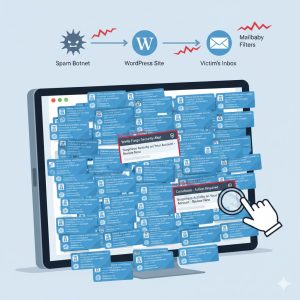
In these attacks, automated bots use your forms to trigger outgoing emails. This happens in two main ways:
- URL Injection: Spammers insert a malicious URL into a field like the “Username.” Your site then dutifully sends a “Welcome” email to the victim containing that spam link.
- Mailbombing: A coordinated attack where an email address is signed up for thousands of sites simultaneously. This is often used to bury important notifications—like bank fraud alerts or crypto compromise emails—under a mountain of “Welcome” messages so the victim doesn’t see them.
How Mailbaby Protects You: WAPHP Rules
To combat this, Mailbaby utilizes WAPHP (Web Abuse PHP) rules. We track patterns, direct data, and “traps” to identify malicious activity:
- Trap Hits: If 20 different traps receive a sign-up from the same recipient, it triggers a pattern match.
- Duplicate Targets: If an account under your control sends multiple sign-up emails to the same address, it is likely being used in an attack.
- Volume Analysis: Our systems detect when unrelated senders are all flooding a single email address simultaneously.
Note: Because Mailbaby only controls the SMTP side and cannot see your internal form data, false positives can occur if your account is being abused. To prevent this, you must secure the source.
How to Stop the Abuse
Here are six possible ways to protect your forms and maintain your sender reputation:
1. For WHMCS Users
If you are running WHMCS, it is critical to enable reCAPTCHA and monitor for suspicious orders. View the official guides here:
2. WordPress Plugins
Adding a challenge to your registration pages is highly effective. A popular option is reCAPTCHA for Login and Registration. While we cannot vet the security of every plugin, this is a widely-used solution.
3. LiteSpeed Server-Side Captcha
If you use LiteSpeed (or open litespeed), you can force a captcha before the request even hits WordPress. Ensure reCAPTCHA is enabled in LiteSpeed, then add this to your .htaccess file:
<IfModule LiteSpeed>
RewriteEngine On
RewriteCond %{QUERY_STRING} "action=register" [OR]
RewriteCond %{REQUEST_URI} ^/my-account [OR]
RewriteCond %{REQUEST_URI} ^/wp-login.php
RewriteRule .* - [E=verifycaptcha]
</IfModule>
4. Disable Registration Entirely
Do you actually need public registration? If your site doesn’t require users to log in, the safest option is to turn off registration in Settings > General. See this guide by Akismet for details.
5. Server-Wide Protection
Consider implementing server-level bot protection such as Imunify360 or CPGuard. These tools can identify and block malicious bot traffic before it interacts with your PHP scripts.
6. Cloudflare & Super Bot Mode
Finally, routing your traffic through Cloudflare and enabling Super Bot Mode provides a robust layer of defense, challenging suspicious automated traffic at the edge.
How do you know? Common rules are
FROM_EMAIL_GETTING_LIKELY_BOT_FORM_HIT_PH_CH – the sender is hitting trap addresses
FROM_EMAIL_IS_SENDING_TO_RCPT_GETTING_DEFERRALS_POSSIBLE_WA_PHP – the sender email is getting deferred (gmail / yahoo will defer users getting too much email)
SFS_RCPT – the user appears in stop forum spam (recipient) form spam sign ups
REDIS_EMAIL_FROM_HIT_BY_BOT_LONGTERM – the sender has been sending to spam traps via forms over the last 30 days
All wa php rules, except LONGTERM, are set to quickly expire, but will re-enable if there is further abuse.